
Go4Schools: Everything You Need to Know
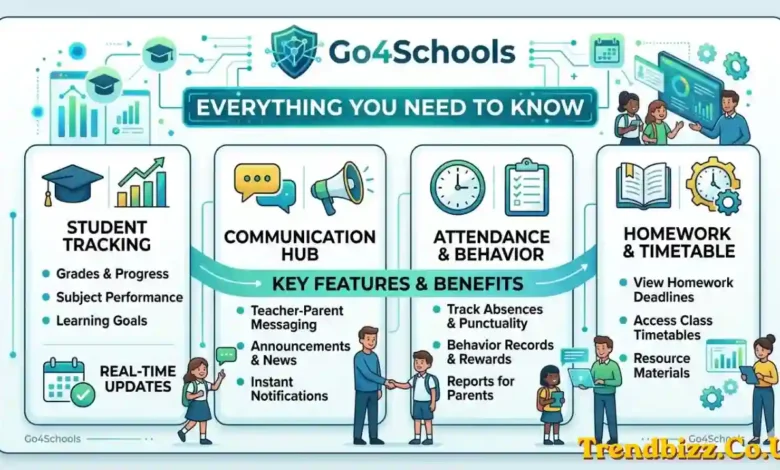
Schools across the UK are constantly looking for smarter ways to keep students, parents, and teachers connected — and that is exactly where Go4Schools comes in. Whether someone is trying to check homework deadlines, review attendance records, or track a child’s progress across every subject, this platform has become a go-to tool for thousands of schools nationwide. This guide walks through everything worth knowing about it.
What Is Go4Schools?
Go4Schools is a UK-based school management platform designed to give students, parents, guardians, teachers, and school governors access to real-time academic data in one centralised place. Rather than relying on paper reports or fragmented communication channels, schools use the platform to bring everything — attendance, grades, behaviour, homework, and timetables — into a single, easy-to-navigate system.
The platform is developed and maintained by Hyperspheric Solutions Limited, based in Cambridge, UK. Schools subscribe to Go4Schools directly, and the level of access available to families depends on which modules the school has included in their subscription.
Key Features of Go4Schools
One of the reasons Go4Schools has gained such a strong foothold in UK secondary schools is the sheer range of tools it offers. The platform covers:
- Real-time attendance tracking so parents and staff can see absences and lateness as they happen
- Homework setting and monitoring, including submission status and deadlines
- Behaviour records, giving a full log of any incidents or commendations
- Grades, marks, and target grades across all subjects
- Student timetables available in daily and weekly formats
- Written progress reports and data snapshots published directly through the platform
- Seating plans for classroom management
- Messaging and inbox features linking school staff with families at home
- SEND, FSM, and other student data flags visible to parents where schools choose to share them
How to Log In to Go4Schools
Student Login
For go4schools student login, the process is straightforward. Students visit go4schools.com, click Login, and select the Student option. First-time users need to request a password via their registered school email address. Once the link arrives, they set a password and gain full access to their personal dashboard.
Parent/Guardian Login
Go4 schools parent login follows a similar process. Parents or guardians visit go4schools.com, click Login, and choose the Parents option. First-time users enter the email address registered with their child’s school and receive a password setup link. Passwords must meet specific requirements, including a minimum length and a mix of uppercase letters, lowercase letters, and numbers.
For families with more than one child at a subscribing school, a single account can display all children’s data without needing separate logins.
Forgotten Password
If a user forgets their password, the “Forgotten your password?” link on the login page will send a reset email to the registered address. It is worth noting that go4 schools login resets are handled through the platform itself — the school cannot reset passwords directly on a user’s behalf.
The Go4Schools App
Beyond the website, there is a free app available on both the Apple App Store and Google Play. The app serves both students and parents using the same login credentials as the desktop site.
However, first-time users must complete their registration on the website before they can use the app — the app alone does not support new account setup. The school must also have an active subscription that includes app access, as not all modules are included in every school’s package.
For families with children at multiple schools, the app supports managing all of them from a single account, making it a convenient hub for busy households. Parents can also adjust notification and communication settings directly within the app to control how they receive updates from the school.
What Parents Can See on Go4Schools
Once logged in, go4 schools student login and parent accounts reveal different views of the same data. From the parent side, users can access:
- Their child’s full attendance record from the start of the academic year
- Behaviour logs and any detention information
- Current grades, marks, and target grades across all subjects
- Published progress reports and written school reports, with email or text alerts when new reports go live
- Homework tasks and submission status
- Timetables for the week ahead
- Special student data such as SEND, FSM, or PPI flags, where the school has chosen to share them
What Students Can See on Go4Schools
For go4schools student users, the personal dashboard includes:
- A personal timetable covering the full school week
- Homework details and deadlines for every subject
- Marks and target grades to track academic progress
- An attendance summary showing punctuality and absence history
- A behaviour record reflecting any logged incidents or praise
- Published school reports when the school releases them
How Schools Use Go4Schools (Staff Perspective)
From a staff perspective, go 4 schools login teachers access a more comprehensive back end. Teachers use the platform daily to record attendance, log behaviour, and enter attainment data. They can publish homework tasks for students to view, generate and release student reports, and monitor individual or cohort progress using attainment-over-time statistics.
The platform also includes curriculum overview tools and a built-in messaging system for communicating with parents. Importantly, Go4Schools integrates with the school’s existing Management Information System (MIS), with data syncing nightly to keep records consistent across both systems.
Go4Schools vs Other School Platforms
When comparing go4schools schools with similar UK platforms such as ClassCharts, Arbor, and SIMS Parent, a few distinctions stand out. Go4Schools offers real-time data access, strong multi-module integration, and a free app for families — all of which are significant advantages for schools looking for a comprehensive solution.
That said, access depends entirely on the school’s subscription. If a school does not subscribe to Go4Schools, or only subscribes to certain modules, families will not have access to all features regardless of their own preferences.
Common Go4Schools Issues and Troubleshooting
Even a well-designed platform runs into occasional hiccups. Here are the most common issues users of goforschools encounter and how to resolve them:
- Login not working — The most frequent cause is using an email address that is not registered with the school. Users should confirm their registered email with the school office.
- Not receiving a password reset email — Always check the spam or junk folder first. If the email still does not arrive, the school office can confirm which address is on file.
- App login issues — As mentioned earlier, go4school student login via the app requires completing registration on the website first.
- Missing app features — If certain features are not visible in the app, the school may not have included the app module in their subscription.
- Who to contact — All support queries should be directed through the school. Go for schools support is always routed via the school, not directly through the Go4Schools support team.
Frequently Asked Questions About Go4Schools
Is Go4Schools free for parents and students?
Yes. The platform and app are completely free for go 4 students and their families to use. Schools cover the cost through their subscription.
Can one account show multiple children?
Absolutely. Go4schools schools login supports multiple children at subscribing schools from a single parent account.
How often is the data updated?
Most data — including attendance, behaviour, and grades — updates in real time. MIS group membership syncs nightly.
What if a school does not use Go4Schools?
Go4shcools access is only possible if the school holds an active subscription. Families cannot sign up independently.
Where is Go4Schools based?
Go4schols, as a platform, is developed by Hyperspheric Solutions Limited in Cambridge, United Kingdom.
Can go 4 schools students log in on mobile?
Yes, via the free app on iOS and Android — provided the school’s subscription includes app access and the user has already registered on the website.
Also Read: Betterthisfacts Information by Betterthisworld – A Deep Dive into Knowledge Truth and Awareness